CJ's Blog, R2-D2, and Picasa.
First let me welcome CJ to the wonderful world of Blogging which you can visit here. Welcome CJ! At first I too felt pressure to supply regular content, now I do as my time/motivation allows and realize that it's all good. I'm happy you've found the same to be universal. Heh.
Speaking of the universe, 30 long years ago in a galaxy far far away, St. Lucas created Star Wars. The US Postal Service is honoring Star Wars with its own stamp series. USPS Jedi Master.com has the details. The promo features postal boxes decorated as R2-D2:
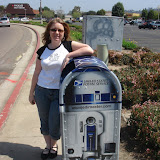
Which brings me to Picasa. The above photo album is hosted there and you can check out my full gallery here. I've just started adding pictures and have only 11 albums online as of this writing (with many more to come, so check back often). I've found that Kellie has a gallery in which she shows off her new house. Go Kellie!
Unlike other photo hosting services that I've tried and/or seen others use - this one allows the viewer to download a full-sized/resolution photo entirely free and anonymously.
Again - You do not have to pay, sign up, or give any information to view or download the photos at the full rez uploaded by the author. To download a picture, go into the album, click on the picture and then click the "download" link on the right. I prefer to upload an "Optimized 1600" format of my pictures. These are at a high enough resolution to use for most wall papers and printouts and yet compact enough to be web friendly.
If you choose you can sign up, have your own free (or pay) account for posting and hosting photos, you can buy prints, etc. But this is all optional. Let me know your gallery link so I can add you to my favorites as I did with Kellie.
Besides the service there is a Picasa program that you can install on your computer to get all sorts of nifty features. For starters, when looking at an album you can download all the pictures, instead of each picture individually.
The program will organize, edit, and generally process the photo collection on your PC. It has caption editing, search screens, red eye removal, printing and blogging features, etc. I'm still learning how best to use it and working the bugs out. Some things I like, others I don't like, but overall I'm glad to have it. The red eye fix for instance can be picky on what it will and won't clean up. Some eyes are done perfectly. Others, not so much. And then there are the "original" poops. The program backs up a copy of the pre-edited photo in a hidden folder. This is nice if you ever want to go back to the original version, but once you're sure you want that red eye gone you have to go in and manually clear this bloat out of the way. There are some other "features" that seem quirky that I'm still working out, perhaps I'll write a full review someday.